Saturday, March 29, 2008

Caching Awareness Day: Part 1

There are probably zillions of posts, tutorials etc around on how to do caching in ASP.NET. However a zillion+1 will not hurt. This post is more for sel-reference more than anything. I admit that sometimes I need to go over features I haven't used in a while (or ever?) to refresh my mind, this is one of those days.

In my current job we have an application that was suffering from a performance hangover when retrieving some records from WebServices and the db. I thought for a while how caching can improve the user experience of some of guilty pages.

After a few months in the thinking room waiting for the go ahead from the bosses, we got right into it. The idea was simple: when a particular record was requested from the services it was first stored in the Cache object and any subsequent request for that data will first check in the Application Cache to see if it's there, if there retrieve it, else go to the WebServices, get it, store it in the Cache etc etc. Needless to say the results where fantastic, the users are happy and they love their 'new' app. We are happy, but I kicked myself in the guts why didn't I do it in the first place!

Anyway, enough yarns. I plan to post a series on Caching and the different techniques that can be used to put some Caching love into your apps.

What is Caching?

Caching is all about storing data, objects, pages, part of pages etc in memory immediately after is requested from the original source. These objects are usually stored for example on the Web server, proxy servers or even the client browser. Think of the benefits, much faster to retrieve data from a proxy server 'nearby'  for example, where this data has been previously requested and stored,  than retrieving the data from probably a data source thousands of miles away and likely to be some data that was computationally expensive to generate and retrieve.

ASP.NET provides two types of caching:

  1. Output Caching, where you can store page and controls responses from the original server to the requesting browser.
  2. Data Caching, where you can programmatically store objects to the server's memory so that the application can fetch them from there rather than recreating them.

Caching ASP.NET Pages: Output Caching

Page output caching allows for subsequent requests for a given page to be provided from the cache so that the code that initially created the page does not execute. This is good for pages that are static and that you are confident are very frequently accessed pages. However if you have content on your page that is generated dynamically or has some dependency on a parameter or even a random image, then the same item will be displayed for the duration of the caching! beware! :-)

To enable OutputCaching, you add a <%@ OutputCache directive to a page. For example, in the page below I have cached this page for 10 seconds.

<%@ OutputCache VaryByParam="none" Duration="10" %>

The contents of your page will not be regenerated each time a user requests the page, also the class behind the page will not be executed during that time. This is the most basic kind of OutputCaching you can set up for a page, although very limited and only useful for very static pages.

Moving on, let's see all the properties that can be set for the OutputCache directive.
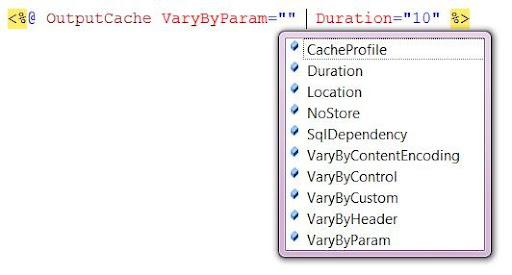
ouputIntellisense

Note that there is a property called 'VaryByParam". This one is very useful. For example, typical Master/Detail scenario, say you have a page where you show all Categories of Products in the Northwind database.
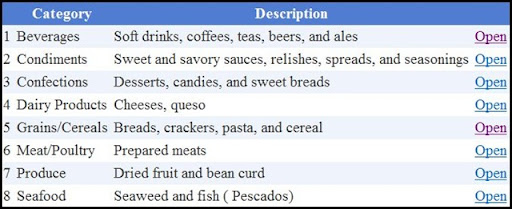
categories

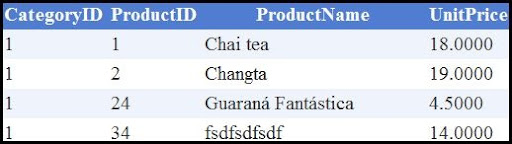
..and then you wanted to display the Products for each category in  a different page, passing the CategoryID in the query string.

Capture2

Capture3 

Now if you did the above setup for your details page, then all your users will see whatever was cached first.

Enter VaryByParam. This helps you by making ASP.NET cache a new instance of the page when a different value for the CategoryID query string parameter is passed to the Products page.

<%@ OutputCache Duration="100" VaryByParam="CategoryID" %>

You can also vary the output cache by multiple parameters by separating the list of params by semicolon in the VaryByParam attribute ..

<%@ OutputCache Duration="100" VaryByParam="CategoryID;ProductID" %>

Also you can generate a new version of the page when any of the params change by assigning a  * to the attribute.

<%@ OutputCache Duration="100" VaryByParam="*" %>

More information in caching by param can be found in MSDN 

OutputCaching by browser Header

It is possible to also use the VaryByHeader attribute to create different versions of a page according to the browser header. For example, my Firefox browser sends the below set of headers with information.

Connection: keep-alive
Keep-Alive: 300
Accept: text/xml,application/xml,application/xhtml+xml,text/html;q=0.9,text/plain;q=0.8,image/png,*/*;q=0.5
Accept-Charset: ISO-8859-1,utf-8;q=0.7,*;q=0.7
Accept-Encoding: gzip,deflate
Accept-Language: en-gb,en;q=0.5
Host: localhost
User-Agent: Mozilla/5.0 (Windows; U; Windows NT 6.0; en-GB; rv:1.8.1.13) Gecko/20080311 Firefox/2.0.0.13

My IE7 sends:

Connection: Keep-Alive
Accept: image/gif, image/x-xbitmap, image/jpeg, image/pjpeg, application/x-ms-application, application/vnd.ms-xpsdocument, application/xaml+xml, application/x-ms-xbap, application/x-silverlight, application/x-shockwave-flash, application/x-silverlight-2-b1, */*
Accept-Encoding: gzip, deflate
Accept-Language: en-AU,es-UY;q=0.7,zh-CN;q=0.3
Host: localhost
User-Agent: Mozilla/4.0 (compatible; MSIE 7.0; Windows NT 6.0; SV1; SLCC1; .NET CLR 2.0.50727; Media Center PC 5.0; .NET CLR 3.0.04506; .NET CLR 3.5.21022)
UA-CPU: x86

You can check what your browser is sneaking out here or here ( as an aside, I heard that in the in 2001 a browser had some customer headers that were used to sneak information about that particular user...read it and see). In .Net I did the above by calling and then iterating the collection.

NameValueCollection headerCollection = Request.Headers;


So......
<%@ OutputCache Duration="1000" VaryByParam="none" VaryByHeader="Accept-Language" %>

That will cache a different page version according to the language used by the user.Right?

...Cache by Browser, getting introduced to the very handy VaryByCustom :-)

You can also cache by the user's browser by using VaryByCustom attribute and using the 'special' browser attribute. By using this attribute, the page will be cached for each mayor browser, its   name and version, eg IE7 and IE8 will result in two different cached versions.

<%@ OutputCache Duration="1000" VaryByParam="none" VaryByCustom="browser" %>

VaryByCustom is very handy. Basically what you can do is write a function in Global.asax or write an HttpModule to handle caching for pages in any way you want.

In Global.asax you do it by overriding the GetVaryCustomString() function.

public override string GetVaryByCustomString(HttpContext context, string custom)
{
     return base.GetVaryByCustomString(context, custom);
}
The function takes two parameters, the HttpContext for the request and a string which is the value you can set in VaryByCustom="[custom_string]", this string can be also be a nunber of string passed along separated by semicolon and you can then split it in GetVaryByCustomString() The context gives you access to everything you expect from HttpContext, session, Request etc etc, 
Example: Say you want to cache pages according to the bosses's mood. 
<%@ OutputCache Duration="1000" VaryByParam="none" VaryByCustom="BossHappinessLevel" %>
Then your custom function could look like..
  
public override string GetVaryByCustomString(HttpContext context, string custom)
{
    if (custom == "BossHappinessLevel")
    {
        MyAjaxEnabledService a = new MyAjaxEnabledService();
        return a.BossHappinessLevel().ToString();       
    }
    return "default";        
}

Based on the string passed, the logic will just return a string that can uniquely identify a request and thus cache a different version of the page according to the current mood! ( The above example doesn't make any sense if your boss is agro all the time, meaning that the "angry" page will be cached most of the time. Of course for this to make more sense, your page will return different content according to the mood too..if he/she is angry or happy or just indifferent. Please drop me an email if you don't get it, I need a drink now! LOL

Caching profiles in Web.Config

Instead of setting the cache policy for each page individually, you can configure page caching in the web.config and then apply your killer settings to lots of pages...

<system.web>
   <caching>
       <outputCacheSettings>
         <outputCacheProfiles>
               <add duration="1000" name="ByBossHappiness" varyByParam="none" varyByCustom="BossHappinessLevel" />
               <add duration="1000" name="ByBrowser" varyByCustom="browser" varyByParam="none" />
         </outputCacheProfiles>
       </outputCacheSettings>
   </caching>
</system.web>

Then your pages can recall any of the cacheprofiles by using the CacheProfile attribute of OutputCache

<%@ OutputCache CacheProfile="ByBossHappiness" %>

Next post:

In my next post I'd like to investigate how to do the above programmatically and also expire pages in code due to some event for example, if someone in the Northwind database adds a new Product by using the Reponse.RemoveOutputCacheItem() function.

Other things left to do include:
  • Partial Page caching.
  • UserControl caching.
  • Data caching
  • Caching by dependencies
  • SQL caching policies by using dependencies!

Wednesday, March 19, 2008

Localisation in ASP.NET: How to write multilingual applications

I been thinking of learning how to do this for a while now, number of reasons for that, my first language is not English, is Spanish, Uruguayan Spanish to be more precise, those that hear me from day to day can witness my struggles with English from time to time. Sometimes you wake up and words just flow, some other times, well.. that's not quite the case.

I always wondered how applications be developed that can then be easily extended to support other languages. Especially in this global village we live in today, in our Pacific region for example there are so many languages that is just mind blowing, from Oceania, South-East Asia, to Japan, the Koreas and even to the other side of the Pacific Ocean there is South and Central America.

Also by pure coincidance a couple of months we were asked to provide an English language version to a  charity website we have been maintaining at home for a number of years now called uruguayosunidos (I'm not responsible for a terrible spelling mistake on the homepage).  Problem is this site is just a plain html site where unfortunately we cannot use localisation. :-(

Enter ASP.NET 2.0 and resource files

One common approach in ancient times was to provide two versions of the same web, one for each language for example, one for Spanish another for English. This can clearly turn into a nightmarish scenario when maintaining the app, imagine!. The good news is that when creating an application with ASP.NET 2.0 or later you can use resource files to contain language specific content, eg one resx file can contain your French content, another can contain your English specific text etc.

ASP.NET supports two types of resources, local and global resources, local resources are scoped to a particular page while a global resource is scoped to the entire application. The equation is simple, if you want content specifically for a particular page, use local resources, now if you want the text that say what your 'Save' button should display through your whole app, then this should be in your global resource file.

To discover how this all works together I first put some labels and textboxes into an aspx page and got right into it. To get started, I just want to display a simple form where a user can enter her first name, last name and a button to submit the entries.

localisation_1

<table>
   <tr>
      <td><asp:Label ID="lblFirstName" runat="server" Text="Name"  /></td>
      <td><asp:TextBox ID="txtFirstName" runat="server"/></td>
      <td><asp:Label ID="lblLastName" runat="server" Text="Last Name" /></td>
      <td><asp:TextBox ID="txtLastName" runat="server"></td>
   </tr>
   <tr class="ButtonRow">
      <td colspan="4"><asp:Button ID="btnSave" runat="server" CssClass="Button" Text="Save" /></td>
   </tr>    
</table>

How to localise Page using Explicit Localisation Expressions:

So far nothing new. What I wanted to do was render those controls text's either in English, Spanish or Chinese according to the user's preferred language.

For that to happen first of all what I had to do was 'localise' the page, first I had to modify the controls to use resources's expressions. This expression is going to get the content from the resource files according to the user's language of choice. For example:

<asp:Label ID="lblFirstName" runat="server" Text='<%$ Resources:lblFirstName %>' />

The value of the Text property is now an "Explicit" resource expression, it is called Explicit because the property is set explicitly to a given value in the resource file for the preferred language.

Also you have to set the Page directive to include UICulture to auto, so when a user requests the page, a file matching her settings will be loaded automatically.

<%@ Page Language="C#" UICulture="auto"...

Associate a resource file to a Page

I created three resource files for this page and I then had to adde them to a special folder called App_LocalResources. You have to create this folder within the same folder as the page you want to localise.

Right-click where you want to add the folder and then Add ASP.NET folder->App_LocalResources,  once this is done, I was ready to add the resource files to the folder. To do this right click on the App_LocalResources --> Add New Item and selecting Resource File as shown below.

localisation_3

Important: To associate a resource file to a particular page, the naming convention is very very important.

It has to be in the format of page_Name.[Culture_Name].resx

See how above I have my Default.aspx page, I want to associate a resource file to deal with users who's language of choice is Spanish-Uruguayan (es-UY)

localisation_2

I added three files, a default resource file that is used in case none of the other resource files match the user's preference/settings (it is strongly recommended to always have a default resource file) and then the files for spanish and chinese simplified. Also note that in this example I have my Default.aspx page and that at the same level I added the App_LocalResources folder.

You can also add a 'neutral' culture resource file and name it in our case Default.aspx.en.resx, in this case the language is set to English without specifying the specific culture name as say AU for Australian, this is used if the user's preferred language is english but not say Australian english.

Resource Files:

Visual Studio has an editor for the resource files which enables you to enter name and value pairs as shown below..

localisation_4

Note that I have associated for my Uruguayan Spanish page the name of the properties to their corresponding values that I will then retrieve from my aspx page.

Resource files are nothing more than XML files that are then compiled by the framework into assemblies in the background! Open them in Notepad and see!

localisation_5

Once I 'localise' all the controls in the page, my aspx looked  like this.

<table>
    <tr>
       <td><asp:Label ID="lblFirstName" runat="server" Text='<%$ Resources:lblFirstName %>' /></td>
       <td><asp:TextBox ID="txtFirstName_Ex" runat="server"/></td>
       <td><asp:Label ID="lblLastName_Ex" runat="server" Text='<%$ Resources:lblLastName %>' /></td>
       <td><asp:TextBox ID="txtLastName_Ex" runat="server"/></td>
    </tr>
    <tr class="ButtonRow">
       <td colspan="4"><asp:Button ID="btnSave" runat="server" CssClass="Button" Text='<%$ Resources:btnSave %>' /></td>
    </tr>    
</table>

Now is up to the user's settings to see what gets loaded. I'm going to setup my preferred language in IE7 to Spanish and see what happens..

To do this: Tools->Internet Options -> Languages button at the bottom. I then added Spanish Uruguay and Moved it to the top to set it as my preferred language as shown below.

localisation_6

Now is all ready to go and loading the page should display my labels and button in Spanish.

localisation_7

And yeah! it worked, look how I associated the lblFirstName property in the Resource file:

 <asp:Label ID="lblFirstName" runat="server" Text='<%$ Resources:lblFirstName %>' />

localisation_8 

If I then set Chinese to my preferred language ( provided I have the Chinese culture resource file as shown below)

localisation_9

Thanks Jerry for the characters! I hope it means what we intend to ;-)

Then loading the page shows the correct content.

localisation_10

Using Implicit Localisation Expressions:

An alternative to explicit expressions is that you use implicit localisation which is very handy if you want to localise controls throughout your page with just one resource key.  The resource expression looks as follows:

<table>
   <tr>
     <td><asp:Label ID="lblFirstName" runat="server" Text="Name" meta:resourceKey="lblFirstName" /></td>
     <td><asp:TextBox ID="txtFirstName" runat="server"></asp:TextBox></td>
     <td><asp:Label ID="lblLastName" runat="server" Text="Last Name" meta:resourceKey="lblLastName" /></td>
     <td><asp:TextBox ID="txtLastName" runat="server"></asp:TextBox></td>
   </tr>
   <tr class="ButtonRow">
      <td colspan="4"><asp:Button ID="btnSave" runat="server" CssClass="Button" Text="Save" meta:resourceKey="btnSave" /></td>
   </tr>    
</table>

The labels and button include the meta:resourceKey property that represents a key in the local resource file. The entries are set to the Text property of the labels and button. I noted that you have to define all the meta resourceKey for each localisation resource file you have.

localisation_11

The advantages of using implicit localisation is that you can use the content for multiple controls, say you have 4+ 'Save' buttons through your page, all you need to do is associate a resource key to the controls. Also it is easier to localise existing apps, all that needs to be done is add meta:resourceKey="Property_Name" attributes  to your existing controls.

Note that is also possible to load resources programmatically by using GetLocalResourceObject(String name):Object and that you can also used it to format text, you can store values in the resource file such as "Welcome {0}!" and then at run time format the string as necessary. 

Global Resources:

While local resources are cool, their limitation is that they are relevant at a page level scope rather than at an application scope. A global resource can then be used through the app for you to setup the localised text. By convention, any resource that you want to be available to all your pages, controls etc should be in a global resource file.

To add global resource files you need to first add another special folder to your solution, this time the folder must be at the root of your application. To add it right-click on your application node --> Add ASP.NET folder --> App_GlobalResources.

Then you just add resource files as I did it for local page level, following the same naming convention as shown before for the language and culture.

Resource_File_Name.[Culture_Name].resx

localisation_12

I called this file Resource.es-UY.resx

Now the interesting thing comes when you want to retrieve the values from a global resource file. The sytnax is slightly different and it is as follows:

   <h2><asp:Literal ID="litWelcome" runat="server" Text='<%$ Resources:Resource,Welcome %>' /></h2>

With global resources you have to specify the name of the resource file and then the property you want to get to.

The result is:

localisation_13

It is also possible to retrieve values from global resources programmatically using GetGlobalResourceObject(string, string) method that takes two parameters, name of the global resource page and name of the property key you want to retrieve.

Because the .net framework converts global resources into compiled classes, you can use strongly typed expressions to retrieve values from the resource files. When you create a resource file, a new class is added to the Resource namespace for you to use! How good is that!!? The snippet  shown below with Visual Studio intellisense doing the damage for the above example. Wicked!

localisation_14

Last but not least there is the Localize control. It is used when you want to localise bigger pieces of text in your apps/pages. It works the same way as described above using meta:resourceKey at page level or using the global resource as in the last example. I can't see a super good use for it since it seems very similar to the Literal and Label controls. Jury still out.

<asp:Localize ID="elLocalisator" runat="server" Text='<%$ Resources:Resource,GoodMorning %>' />

That all!

This was a very interesting post to write, learned some tricks, there's still a lot to cover for example, how to format currency and DateTime according to culture, setting cultures programmatically or in web.config or page level. Maybe is there is interest we can do it later.

Hope it helps someone out there!

el#

Resources:

Tuesday, March 18, 2008

How to change IE7 default 'View Page Source' text viewer in Windows XP/Vista

I really love Notepad</grin>, I think it does a wonderful job with the really simple things, like a quick and dirty way of opening text files, web.configs (if you are in a rush only of course).

Now, if you are a web developer and say you want to see the source code of any given page or you might get a JavaScript error in line 1209 and want to have a look at it..then honestly NotePad does not cut it really.

I use Notepad++ at work http://notepad-plus.sourceforge.net/uk/site.htm and so far I'm a very happy chap.


So how do you change to say..Vi in Windows XP

  1. Download TweakUI from http://www.microsoft.com/windowsxp/downloads/powertoys/xppowertoys.mspx
  2. Start Tweak UI and update your view source editor under Internet Explorer | View Source, and then point it to the exe of your editor of choice.


But mate, what about Vista?

oh yeah!, TweakUI does not work in Vista so I read this IE7 blog entry in the msdn blogs


 http://blogs.msdn.com/ie/archive/2007/03/28/ie7-in-vista-configuring-your-view-source-editor.aspx


You can also download this mini-app to do it for you ( preferred choice, since I could not find the HKey described above on my Vista sys)


http://www.iconico.com/viewSourceEditor/  ( skip the registration!)


Worked very well.


Capture

WCF Services - Part 2

In the last post I tried to show how to use HTTP GET to get data back from my Services. Now I want to put my thoughts in order and show how I created new Employees and updated them using programmatic POST using the ubiquitous Northwind database.

My first attempts where at trying to update a record using values embedded in the querystring... easier said than done, it was quite an effort.. At then end it worked, it just required a shift in the way I was tackling the problem. I ended up having my contract accept a Stream parameter and then had to read the stream and get the values back.


My contract was:

//STREAM EXAMPLE
[OperationContract]
[WebInvoke(UriTemplate = "*", Method = "POST")]
void UpdateEmployeeName(Stream id);

My uri template was "*" since I wanted to have the querystring collection of values straight after the 'root' of my Service.svc

My implementation was very simple...

public void UpdateEmployeeName(Stream id)
 {
     StreamReader reader = new StreamReader(id);
     String res = reader.ReadToEnd();
     NameValueCollection coll = HttpUtility.ParseQueryString(res);
     
     int employeeID = Int32.Parse(coll["elid"]);
     String newName = coll["newName"];
     // Bless LinqToSql
     NorthwindDataContext cts = new NorthwindDataContext(ConnectionManager.GetHomeLocalConnectionString);
     Employee e = cts.Employees.Where(a => a.EmployeeID == employeeID ).Single();
     e.FirstName = newName;
     cts.SubmitChanges();
 }

Now, how the heck do I make a programmatic POST to my contract?

I just created a WebRequest and set the content type to form-urlencoded and set the request length to the length of my queryString collection.

//set the data
ASCIIEncoding enc = new ASCIIEncoding();
string datatext = "elid=" + elEmployeeID.Text;
datatext += "&newName=" + elEmployeeNewName.Text;

byte[] data = enc.GetBytes(datatext);

//HTTP POST query
WebRequest request = HttpWebRequest.Create("http://localhost/DemoWCF/Service.svc");
request.Method = "POST";
request.ContentType = "application/x-www-form-urlencoded";
request.ContentLength = data.Length;

Stream datasteam = request.GetRequestStream();
datasteam.Write(data, 0, data.Length);
datasteam.Close();
WebResponse response = request.GetResponse();
 

To test it I threw a few textfields together and magic....

part2_1


And checking the db....


part2_2


I also wanted to create a new Employee using Javascript using a programmatic post as above but this time using Javascript Object Notation (JSON ) http://www.json.org/


My contract..

[OperationContract]
[WebInvoke(BodyStyle = WebMessageBodyStyle.Wrapped,
RequestFormat = WebMessageFormat.Json,
ResponseFormat = WebMessageFormat.Json,
UriTemplate = "/CreateEmployee")]
void CreateEmployee(string FirstName, string LastName);
Implementation:
public void CreateEmployee(string FirstName, string LastName)
{
      NorthwindDataContext cts = new NorthwindDataContext();
      Employee e = new Employee();      
      e.LastName = LastName;
      e.FirstName = FirstName;
      cts.Employees.InsertOnSubmit(e);
      cts.SubmitChanges();           
}


To generate an HTTP POST call with JavaScript, I created a XMLHTTPRequest and then I just constructed the url, set the header content type to json and was careful to format my JSON pair's payload..

<asp:Button  ID="btnJSONCreateEmployee" runat="server" OnClientClick="doEmployeeCreate()"
function doEmployeeCreate()
{            
       var newFirstName = document.getElementById('TextBox1').value;            
       var newLastName = document.getElementById('TextBox2').value;
            
       var xmlHttp = new XMLHttpRequest();            
          
       // Create result handler 
       xmlHttp.onreadystatechange=function()
       {
          if(xmlHttp.readyState == 4)
          {
             document.getElementById("result").value = xmlHttp.responseText;
           }
       }
            
       var url = "Service.svc/CreateEmployee";
       var body = '{"FirstName": '+ '"' + newFirstName + '"';
       body += ', "LastName": ' + '"'+newLastName + '"' + '}';
            
       //Send the Http Request
       xmlHttp.open("POST", url, true);
       xmlHttp.setRequestHeader("Content-type", "application/json");
       xmlHttp.send(body); 
}


To create a JSON payload in C# is very simple, just format a string carefully, escaping the " and you'll be fine..

protected void btnCallService_Clicked(object sender, EventArgs args)
{
   ASCIIEncoding enc = new ASCIIEncoding();
   string employeeID = txtJsonEmpID.Text;
   string firstName = txtJsonFirstName.Text;
   string lastName = txtJsonLastName.Text;           
   string datatext = "{\"EmployeeID\":{0}, \"FirstName\":\"{1}\"  , \"LastName\":\"{2}\" }";
        
   datatext = datatext.Replace("{0}", employeeID)
                      .Replace("{1}",firstName)
                      .Replace("{2}", lastName);
               
   byte[] data = enc.GetBytes(datatext);

   WebRequest request = HttpWebRequest.Create("http://localhost/DemoWCF/Service.svc/CallJason");
   request.Method = "POST";
   request.ContentType = "application/json";
   request.ContentLength = data.Length;
   
   Stream datasteam = request.GetRequestStream();
   datasteam.Write(data, 0, data.Length);
   datasteam.Close();
   WebResponse response = request.GetResponse();
}


Ok, now unfortunately one of the new Employees didn't leave good comments in SVN and el# got a bit upset when he had a look at the logs. So let's fire the guy, tough choice yes, but then also we need to demo a programmatic HTTP DELETE.

part2_3 

Simple contract...I just specify the request format, the response format and the method that my client will be using..

 
[OperationContract]
[WebInvoke(BodyStyle = WebMessageBodyStyle.Wrapped,
    RequestFormat = WebMessageFormat.Json,
    ResponseFormat = WebMessageFormat.Json,
    UriTemplate = "/FireEmployee",
    Method="DELETE" )]
void FireEmployee(int EmployeeID);

Implementation is dead simple...this has got nothing to do with WCF, but I just post it here for completeness.

public void FireEmployee(int EmployeeID)
{
    NorthwindDataContext ctx = new NorthwindDataContext();
    Employee emp = ctx.Employees.Where(e => e.EmployeeID == EmployeeID).Single();
    ctx.Employees.DeleteOnSubmit(emp);
    ctx.SubmitChanges();  
}  

Calling using JavaScript is v. simple too..

function fireTheGuy()
{
    var employeeID  =  document.getElementById('txtToDeleteEmployeeID').value;
    var xmlHttp = new XMLHttpRequest();            
          
    // Create result handler 
    xmlHttp.onreadystatechange=function()
    {
        if(xmlHttp.readyState == 4)
        {
          document.getElementById("result").value = xmlHttp.responseText;
        }
    }
            
    // void CreateEmployee(string FirstName, string LastName);
    var url = "Service.svc/FireEmployee";
    var body = ' { "EmployeeID": ' +  employeeID + ' }';
            
    //Send the Http Request
    xmlHttp.open("DELETE", url, true);
    xmlHttp.setRequestHeader("Content-type", "application/json");
    xmlHttp.send(body);       
}
 

And trust me, it works like a charm.

Next post I would like to return complex types back to the client, as in Employee's objects etc..


Wednesday, March 12, 2008

REST with WCF

At the MS Heroes day, a few thursdays ago, our first session was on WCF and is fair to say a few of us were very impressed by what I saw and I just couldn't wait to recreate those presentations on my desk..

What is WCF?

From MSDN,

Is a set of .net Technologies for building and running connected systems. It is a new breed of communications infrastructure built around the Web services architecture. Advanced Web services support in Windows Communication Foundation provides secure, reliable, and transacted messaging along with interoperability. The service-oriented programming model of Windows Communication Foundation is built on the Microsoft .NET Framework and simplifies development of connected systems


What is REST ?

REST is a architectural model ( it is not a standard ) for distributed computing that defines how resources are distributed and addressed.

The acronym means Representational State Transfer, translated to mere mortals language it means that each unique URL is a representation of some data. It was term invented by Roy Fielding one of the principal authors of the HTTP protocol.

I will post resources and links later in the post. However Google for REST and you'll get heaps of results if you are curious. Definitions are boring! I like doing things. But you need to know a bit of the theory.

eg:

http://localhost/myWebService/Employee/2

http://localhost/myWebService/Employee

http://localhost/myWebService/Product/89

REST WebServices: An alternative to SOAP

All the above urls will return you different data ( a representation of the resource requested ) according to (of course) on how you map this URL to your contracts.  First link might be mapped to return you the Employee with ID =2 and so on, or the Product with ID = 89

Basic principles

  1. Identify the entities you want to expose a representation eg Employee, Product
  2. Create URL for each resource/entity. Resources should be nouns.
  3. Categorise resources according to whether clients can just get a representation of your data or whether they can modify the data. For resources that you just want to make available to clients, make them accessible using HTTP GET, for resources that you want to give the client the possibility to modify data, make them accessible using HTTP POST, PUT or DELETE
  4. Resources accessible via GET should be 'side effect' free. This means the web service call should not modify the data in the back end.

Yahoo and Flickr amongst others use REST web services. Example of Flickr REST web service can be seen here

Main advantages of using REST

  • Easy to work with, and easy to read for 'humans'.
  • Easy to consume ( not always, I hear Amazon services can be a pain to parse )
  • Improved server response times.


I started working with this on the weekend after Microsoft Heroes in Sydney. At the time I challenged myself not to Google for answers and get the examples working only with the help of MSDN for WCF.

It was not easy at first, MSDN is huge and it throws so much information at you, if you are not careful you start losing track of what link you open where and soon you lose track of what you are reading, at least I do!

Needless to say it wasn't that easy. I find it interesting to see how much developers including myself sometimes google problems searching for tailor-made answers. Imagine a world without Google? Is mindblowing to think how older programmers looked for answers 20 years ago, maybe things where simpler those days. Hrmm..

Ok, so lets get started, first of all I went NewSite -> WCF Service. Visual Studio will create a simple solution with an IService and a Service class and also a Service.svc file.

First of all lets look at the IService interface is provided by default.

[ServiceContract]
public interface IService
{

    [OperationContract]
    string GetData(int value);

    [OperationContract]
    CompositeType GetDataUsingDataContract(CompositeType composite);

    // TODO: Add your service operations here
}

FIrst thing you do is define a contract. You do this by adding the [ServiceContract]  attribute to your interface.  This contract will define what operations your webservice will ultimately support. Think of an operation as a method call that your service will expose. Each method in the interface that you want to expose, must then have the [OperationContract]  attribute defined / applied to it. If a method does not have this attribute, it won't be exposed therefore it wont be accessible by the service's clients.

We then have to implement this interface and implement each method that we defined in our ServiceContract.

I want to expose a method by a REST WebService to return an Employee Name representation when the URL is "GetEmployeeName/{id}".

Remember that if we just want a representation of our data without any side effect by the REST principles we have to use the HTTP GET verb. WCF Web model allows you to do this by using the WebGet method attribute for Get operations. All you have to do is adorn your method with WebGet.

For that to happen I have to define  my operation contract in the interface as follows:

[OperationContract]
[WebGet(UriTemplate= "GetEmployeeName/{id}", ResponseFormat = WebMessageFormat.Xml)]
stringGetEmployeeName(Stringid);

In the WebGet attribute we can also describe the layout of the URL that our WebService will respond to. For example I want the method above to be called upon to answer the GetEmployeeFirstName call when the URL is MyService.svc/GetEmployeeName/2

We do this by adding a UriTemplate property to our WebGet attribute. This templates allow you to match an incoming URL to an operation in the service. The ResponseFormat attribute is self explanatory, you can choose XML or JSON.

Now we have to implement our GetEmployeeeFirstName method in our class.

public class Service : IService
{

    public string GetEmployeeName(string id)
    {
        NorthwindDataContext ct = new NorthwindDataContext();
        return ct.Employees.Where(a => a.EmployeeID == Int32.Parse(id)).Select(a => a.FirstName + " " + a.LastName).Single();
    }
}

I'm using LinqToSql again to retrieve employees from the Northwind database.

We are almost ready to go now. I had my biggest struggle with the web.config and configuring behaviours and endpoints. I wasn't the only one that struggled, for what I can gather around blogs etc and the poor MSDN documentation this wasn't that straightforward.

I settled for the config settings below...

<system.serviceModel>
        <bindings>
            <webHttpBinding>
                <binding name="ServiceBehavior"></binding>                
            </webHttpBinding>        
        </bindings>
        <services>
            <service name="Service" behaviorConfiguration="ServiceBehavior">
                <!-- Service Endpoints -->
                <endpoint address=""  binding="webHttpBinding" behaviorConfiguration="ServiceBehavior" contract="IService"></endpoint>
                <endpoint contract="IService" address="mex" binding="mexHttpBinding"></endpoint>                
            </service>            
        </services>
        <behaviors>
            <endpointBehaviors>
                <behavior  name="ServiceBehavior">
                    <webHttp />                     
                </behavior>                
            </endpointBehaviors>
            <serviceBehaviors>
                <behavior name="ServiceBehavior">
                     To avoid disclosing metadata information, set the value below to false and remove the metadata endpoint above before deployment 
                    <serviceMetadata httpGetEnabled="true" />
                                     To receive exception details in faults for debugging purposes, set the value below to true.  Set to false before deployment to avoid disclosing exception information 
                    <serviceDebug includeExceptionDetailInFaults="true"/>
                </behavior>  
            </serviceBehaviors>
       </behaviors>
</system.serviceModel>

Since I'm using the WCF web model and all my requests are through HTTP and not SOAP I have to use webHttpBinding .

From MSDN..

The WCF Web Programming Model allows developers to expose WCF Web services through HTTP requests that use "plain old XML" (POX) style messaging instead of SOAP-based messaging. For clients to communicate with a service using HTTP requests, an endpoint of the service must be configured with the WebHttpBinding that has the WebHttpBehavior attached to it. The WCF Web Programming Model also requires that the individual service operations are annotated with the WebGetAttribute or WebInvokeAttribute attributes. This defines a mapping from a URI and HTTP method to the service operation, as well as the format of the messages used to call the operation and return the results. Support in WCF for syndication and ASP.AJAX integration are both built on top of the WCF Web Programming Model.

SO far so good, Now if we run our WCF app and we invoke the URL with GetEmployeeName/2 the employee name should be returned...

http://localhost/DemoWCF/Service.svc/GetEmployeeName/2

Capture

http://localhost/DemoWCF/Service.svc/GetEmployeeName/3

Capture2

(BTW Vista Snipping Tool kicks bum big time!!!) ( David, I got to talk you into Vista for blogging Windows Live Writer Full, is awesome)

Lets say I know want to get all the Employees Names by going to an url like this

http://localhost/DemoWCF/Service.svc/Employees

[OperationContract]
[WebGet(UriTemplate = "Employees", ResponseFormat = WebMessageFormat.Xml)]
List<String> GetEmployeesNames();

My implementation of the operation would be something along the lines of..

public List<String> GetEmployeesNames()
{
    NorthwindDataContext ct = new NorthwindDataContext();
    Enumerable<String> ab = from emps in ct.Employees
                            select emps.FirstName + " " + emps.LastName;
    return ab.ToList();
}

And the result would be..

Capture3 

Now if I wanted the Response to be of

WebMessageFormat.Json

I would then have to change my OperationContract to note my intention as follows

[OperationContract]
[WebGet(UriTemplate = "Employees", ResponseFormat = WebMessageFormat.Json)]
List<String> GetEmployeesNames();

When I then go to the URI, you will then get prompted to save the response as a file...

image 

that upon opening with trusty Notepad you can see the JSON string...

Capture5 

In this post I just wanted to show how I got my REST services to work and I then plan to post about how to use PUT, POST and DELETE , how to return complex types, DataContracts and also how to pass querystring values to your OperationContract as a Stream, that in fact was the first thing that I got working. ( Quick preview below). I would also like to post all the source code of my working examples.

[OperationContract]
[WebInvoke(UriTemplate = "*", Method = "POST")]
void UpdateEmployeeName(Stream id);
Implementation
public void UpdateEmployeeName(Stream id)
{
   StreamReader reader = new StreamReader(id);
   String res = reader.ReadToEnd();
   NameValueCollection coll = HttpUtility.ParseQueryString(res);
   int employeeID = Int32.Parse(coll["elid"]);
   String newName = coll["newName"];
   NorthwindDataContext cts = new NorthwindDataContext();
   Employee e = cts.Employees.Where(a => a.EmployeeID == employeeID ).Single();
   e.LastName = newName;
   cts.SubmitChanges();
}
See you then.........

Tuesday, March 11, 2008

Playing around with Silverlight 2.0 Beta 1

Since Silverlight Beta was released a few days, I wanted to have a look around and see what can you do with it.

After I did all the admins stuff like downloaded the beta, installed etc I started following ScottGu's tutorials on his blog to get an idea.

I thought, hell what I'm going to do! I've got no idea and certainly no skills as a designer, so I thought ok, lets simulate the AjaxAutoComplete extender and see where it takes us.

First of all I created a Silverlight application...

image

Then Visual Studio told me that in order to run a SL app, I need to host in a web page.

image

In project type above you can either choose, WebSite or WebAppliucation type..hrmm.

Upon clicking ok you are presented with an empty xaml page called Page.xaml

Now, the Silverlight control, because that is what we are creating, "lives" inside an html/aspx page. Note that the ctrl Source property is pointing to SuperApp.xap...

image

What the heck is this .xap file? I hear you ask..

Nothing too exciting, it is the compiled Silverlight application in zip format. This file contains the dlls it needs to run like System.Windows.Controls.dll and System.Windows.Controls.Extended.dll and the dll of your app in our case SuperApp.dll.

Dealing with the Xaml..

First of all I need to build the GUI for the TextBox and ultimately my dodgy AutoCompleteExtender.

What do we need?

  • Need a TexBox
  • Need some sort of DropDownList that is displayed as the user types in..
  • Need a button to submit the selected name eventually.


I choose <Canvas> as my layout, there is Grid and StackPanel. I used Grid too and it looked very easy to use, it was like creating an html table and then referencing to the x,y cells..very cool.

This is the Xaml for my text box. Note the Canvas.Top and Canvas.Left, no prize for guessing that it references the parent container of my textbox and it tells it to position it 100 pixels from the left and 20 from the top

<TextBox x:Name="TextBox_EmployeeName" Canvas.Left="100" Canvas.Top="20" Width="200" BorderBrush="CornflowerBlue" BorderThickness="1" Height="30" />

The button is very simple:

<Button Click="Save_Click" Content="Save" Canvas.Left="310" Canvas.Top="20" x:Name="Save"Width="60" >

I also added an event listener for the Click event.

Now for the ComboBox-look a like. There is no ComboBox in Silverlight Beta, so the closest thing is a ListBox.

Lets aligned right under the bottom of the TextBox and see what happens. At this stage of the game I was very hopeful that this will be able to be done.

<ListBox  KeyDown="EmployeeNames_KeyDown"  
        MouseLeftButtonDown="EmployeeNames_MouseLeftButtonDown"  
        Visibility="Collapsed" x:Name="EmployeeNames" 
        Width="200" Canvas.Left="100" Canvas.Top="46" />

Ok, so far so good, note I added two events to my ListBox, KeyDown and MouseLeftButtonDown. Basically these two events will 'listen' for when the user presses a key while this control has focus and also while the Mouse left button is pressed also while focus is on. ( I was thinking hrmm, this reminds me of SWING development back at uni in Java..)

Resulting page is: ( beautiful )

basic_Silver_Gui

Next question I had was. Ok I have to get some data from my Northwind database. I want text to resolve back to an EmployeeName. How am I going to do this? WebServices with WCF..

Note: This WebService has to be configured as BasicHttpBinding.

You cannot add a WebService to the Silverlight application, you have to do it somewhere else. In this case I added it you my WebSite. AddNewItem --> WCF Service.

I defined my [ServiceContract] Interface and my OperationContracts

and then my DataContract, because I wanted to return a MyEmployee object from my WCF webService.

[ServiceContract]
public interface IMyService
{
    [OperationContract]
    int CountEmployees();

    [OperationContract]
    MyEmployee GetEmployee(int id);

    [OperationContract]
    List<MyEmployee> GetAllEmployees();

    [OperationContract]
    String[] GetAjaxyEmployeeNames(String prefixText);
}

[DataContract]
public class MyEmployee
{   
    [DataMember]
    public string Name { get; set; }

    [DataMember]
    public int GetEmployeeID { get; set;}

    [DataMember]
    public String Address { get; set; }

    [DataMember]
    public String Title { get; set; }  
}

Then I had my MyService class that implemented my IService interface.

The function of interest is the GetAjaxyEmployeeNames, since it returns a String[] with the names that start with the prefixText passed on. Also note that you cannot add LinqToSql to Silverlight 2.0 Beta app, it is not supported at this stage, it does support LinqToXml though and one of ScottGu's tuts shows this. Since I added the Service to the WebSite, I just added a dbml file and drag-and-dropped the Employee table. Piece of cake.

public string[] GetAjaxyEmployeeNames(String prefixText)
{
       NorthwindDataContext ctx = new NorthwindDataContext();
       var emps = from e in ctx.Employees
                  where e.LastName.StartsWith(prefixText)
                  orderby e.LastName descending
                  select e.LastName + ", " + e.FirstName;
       return emps.ToArray<String>();        
}

Now we have the webService sorted out. We need to add a reference to our Silverlight app about this. The way to do it is very easy. Just right click on the project file Add Service Reference and you will be shown the dialog below..then discover and hopefully it will find the web service we just created.

image

Back to the Xaml now.

We have to add an Even listener to our TextBox, so when the text changes in the txtBox, the webservice will be called. This is easy, we just add a TextChanged event handler.

<TextBox TextChanged="TextBox_TextChanged"
        Canvas.Left="100" Canvas.Top="20" Width="200" Text=""
        x:Name="TextBox_EmployeeName"
        BorderBrush="CornflowerBlue" BorderThickness="1"
        Height="30">

I love the way VS does this for xaml pages, as soon as you type KeyDown the intellisense will ask you if you want to create a new listener, and if you press enter, VS will create a function in the codefile with some real cool naming by default.. wish we had this for normal asp.net! ( ScottGu said this is coming soon!)

I also added a KeyDown handler, so when the textbox has focus and the user presses the down arrow key, the behaviour of the real AutoCompleteExtender is simulated and the focus and control moves on to the ListBox.

event_intellegince

We have the handlers now, next we have to create a proxy to our WebService so they methods it exposes can be called. 

  1. Add two using statements to System.ServiceModel and System.ServiceModel.Channels.
  2. Create a binding element in the scope of the class ( so we can use it everywhere!). Binding binding = new BasicHttpBinding(); Bindings specify the details for a client to communicate with the Service. The only binding supported at this stage is BasicHttpBinding.
  3. Next we have to create an EndPointAddress. This gives the address of the Service to be called upon. So we just use the address where this service is being hosted.
  4. EndpointAddress address = new EndpointAddress("http://localhost:50740/SilverlightApplicationFirstEver_Web/Services/MyService.svc")
     

We now have everything we need to create our proxy and call the Service. Remember we have a listener for when the user enters text in our TextBox and so the TextChanged event fires.

To create the proxy to our service, the proxy's constructor takes in the binding and endpointAddress.

To now call the methods in our service we have to realise that all calls in Silverlight are asynchronous. In this case I'm using the event driven pattern where the proxy contains two members for each potential call to the Service, these are an async method and a completed event that is raised once the async call returns. This results on the following members:

resultingmethods 

The complete function looks like this:

completed_function

And the proxy_AjaxyEmployeeCompleted function that handles the returned data from the WebService is:

proxy_completed_call 

Note that the ListBox is hidden unless there is a result to display.

Now as soon as you type something in, the service will be displayed and the ListBox ItemsSource property ( think of it as a DataSource in Asp.net ) is bound to args.Result, which is a String[]

extenderinaction 
 

Thats basically it, I have more functions to simulate the real AutoCompleteExtender, like for example when the user clicks with the mouse on say "King, Robert" that Employee name will be selected and will be copied into the TextBox.

Also I have a listener on the ListBox that listens for any down arrow key pressed and mouse left button events that copy the SelectedItem text to the TextBox again.

mousedown

And to finish up, when the TextBox has focus and the user presses the down arrow key, this means that she will like to go on an navigate through the employee names in the ListBox. To to this we added a KeyDown listener on the TextBox.

keydowned_textarea 
 

Out of interest I then opened the solution file in Expression Blend 2.5 March edition and got to play with colours etc etc. Very cool but well outside my domain all this designer stuff..

image 

Well, is all good, I learned heaps about Xaml etc. VEry powerful, but also learned that things can get very complicated very quickly. There are some sample apps that come with Blend that are plain scary.

image 

A photo book where you can "grab" the pages from the lower right corner..

image 

impressive this paint look-alike..

image 


Friday, March 7, 2008

Silverlight Beta 1 and Silverlight Tools 1 for VS2008 Released!

Technorati Tags:

At MIX08 Microsoft announced the releases of Silverlight 2 Beta 1 and the tools suite for VS2008.

The download for the plug in is around 4 MB for SL 2, and over 54MB for the tools.

Tools can be found here and the Silverlight plug-in can be downloaded from here

If you want to get into it I reckon a good place to start will be in http://silverlight.net/Learn/ where you can find tutorials and labs!? MSDN articles are a bit rough but useful.

Source code for the controls and Unit tests were also released and can be found here

Also it was announced the release of Expression Blend 2.5 March Preview, which you will need if you want to play around with the labs in the learn section.

Heard in dot.rocks about the Telerik RadControls for Silverlight controls, you can have a look at their work in progress here

I haven't played with Silverlight at all just yet but I been following what's coming out of Redmond through ScottGu and his blog. He published a number of tutorials that I'm eager to have a closer look now that I installed the tools.

I wonder what impact this is going to have on the web?

Lots of controls out of the box..


Silver_toolbox

I also had to create a simple HelloWorld type page. And I have to admit it looks cool. 

Silver_hello_world

The XAML...

Silver_HelloWorld_Code